Live on the App Store · the advanced logger, made social

Log faster.
Train together.

Get To is the most advanced way to log a workout — quicker sets, smarter targets, deeper stats — with a social performance layer no other app has: a live feed, leaderboards, challenges, and a score that makes every session count.

★★★★★ Free to start —  built with real early lifters
📈
You passed Dani
Rank 2 of 40
🏅
Badge earned
Volume King
⚔️
Rival · Jake
You lead 3–1
A look inside

Built like a premium product.

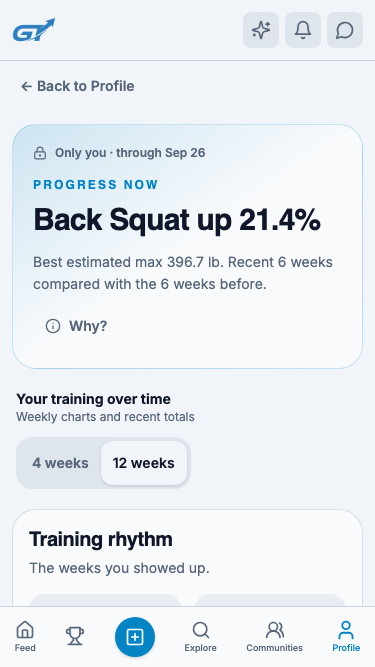
Every screen is designed to make you want to open it again — your profile, your shareable scorecards, your progress over time.

Two apps in one

An elite logger.
A social performance network.

Get To nails the fundamentals — the fastest, smartest way to log a workout — then adds a whole new social layer on top. You never have to choose between the two.

⚡ The logger
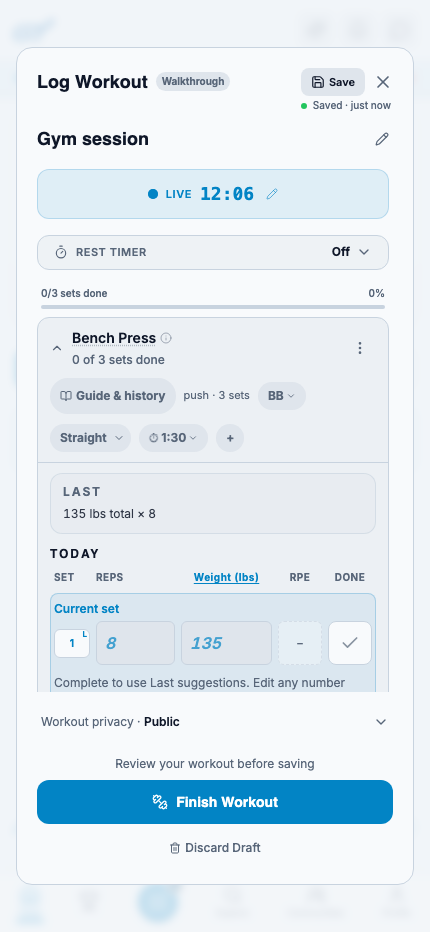
Log a set in a tap — targets, last-time weights, rest timer
PRs and 1-rep-max surfaced automatically
Full history, trends and deep analytics
Apple Watch, Garmin, Oura & more, synced
◆ The social layer
A live feed of your gym's real workouts
Leaderboards, challenges and communities
Collectible badges and friendly rivalries
GPI — one performance score, 0–1000
The social layer

Social, done in a whole new way.

Post

Every session shows up scored and ranked — your gym sees exactly where you stand, not just that you showed up.

Discover

Get inspired by real workouts, save what works, and get Get To-suggested sessions of your own.

Compete

Join challenges and communities, climb the leaderboard, and earn badges that actually mean something.

The ritual

One loop. Every session.

Open, lift, score, share — designed so the next workout is the easiest thing you do all day. Scroll to watch it move.

01 — See

See what everyone trained.

Open to a feed of your friends, your gym and the lifters you follow — real workouts, real numbers, and a little healthy pressure when you've gone quiet.

Friends & gymGet inspiredSave any workout
02 — Share

Post yours in a tap.

Log during the set — targets pre-loaded, PRs lighting up as you hit them — then share it to the feed with the numbers attached. No spreadsheet, no typing it up after.

Live loggerPRs attachedOne-tap post
03 — Compete

Climb the board. Earn the badge.

Join challenges and communities, race up the leaderboard, and collect badges that mean something — because your crew watched you earn them.

ChallengesCommunitiesBadges
Challenges · Communities · Badges

Turn training into a team sport.

Start a challenge with your gym, join a community that trains like you, and climb a live leaderboard. Hit the milestones and you earn badges — permanent, collectible, and worth more because everyone watched you get them.

🏅30-Day Streak
🔥Volume King
PR Machine
🔒Locked
Wearables

Your watch already did the work.

Connect Apple Watch, Garmin, Oura, Whoop, Fitbit or Polar and your cardio shows up as a premium, brand-true card — zones, avg & peak heart rate, route maps — reconciled onto the right session automatically. Even when the data lands hours late, the card still renders beautifully.

Apple Watch Garmin Oura Whoop Fitbit Polar
Programs & inspiration

Follow a program.
Or borrow an athlete's.

Pull a proven plan from the marketplace, curate a program from the athletes whose numbers you respect, or let Get To suggest your next session. Bringing your coach's spreadsheet? Photo, PDF or CSV — parsed into a schedulable plan.

  • Explore a marketplace of real programs, tracked and autoregulated.
  • Train like anyone you follow — their splits, adapted to you.
  • Get suggested sessions tuned to your real loads — or upload your own.
Performance & data

And the numbers, when you want them.

Under the social layer is a serious tracker. Everything you log rolls into GPI — one 0–1000 performance score — alongside per-lift trends, e1RM and a momentum streak. Depth for the days you want to nerd out; quietly out of the way on the days you don't.

  • GPI, 0–1000 — one honest number with struck-metal tiers and a "why it moved" story.
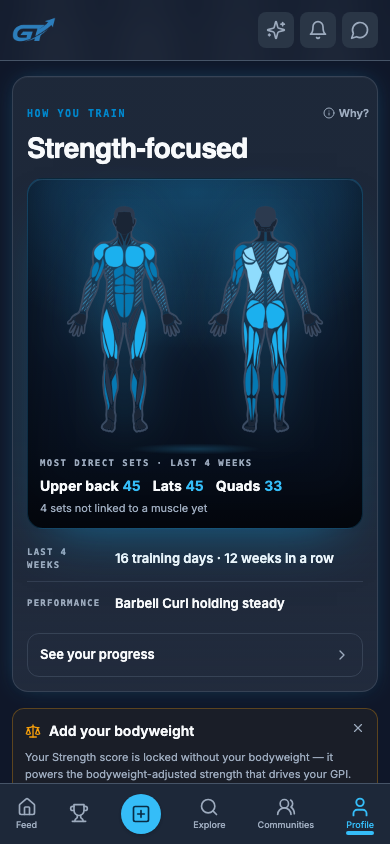
  • Progress & muscle maps — trends, e1RM, plateau alerts, and what you've been neglecting.
  • Momentum — a consistency streak that rolls when you train and bleeds off when you rest.
And the rest

Everything else that makes it stick.

The score and the feed are the hook. The depth underneath is why people stay.

Rivals

Pick a rival, keep a head-to-head record, and let a little friendly rivalry do the motivating.

Direct messages

Mutual-follow DMs to plan sessions, talk shop and send a rival a little pre-lift trash talk.

Scorecards & shareables

Editorial, animated workout cards built to leave the app — IG Stories, exports, the whole kit.

Suggested workouts

A next-session prescription tuned to your real loads and recovery — not a generic AI plan.

Gyms & check-ins

Find your gym, review it, and tie your sessions to where you actually train.

Notifications that land

Tap a like or comment and go straight to the exact spot it happened. No dead ends.

From the App Store

Built for those who train hard.

★★★★★

5.0 on the App Store

★★★★★

"10/10 fitness app. Easy to navigate UI. The best practical integration of AI I have seen in a fitness product. Would recommend hands down if you are looking for a way to stay motivated and accountable on your fitness journey."

"Amazing"App Store review
★★★★★

"I recently downloaded this app and I am already feeling like I can't go a day without logging my activity. It's a great way to keep track of your workouts and progress over time and also hold yourself accountable!! Everyone download this app!!!"

"Great way to be held accountable"App Store review

Get to it.

Your first workout is a score. Your hundredth is a status. Download Get To, log one session, and watch the number start to move.

Our story

Built by lifters, for people who train hard.

We're building the social home for the weight room — the most advanced way to log a workout, wrapped in a community that makes you want to show up.

Why we started

Every serious lifter already tracks their workouts. But the gym is one of the most social places in the world, and no app treated it that way. Logging apps handed you a private spreadsheet; social apps handed you a feed with no substance. We wanted both — a logger good enough to use on every set, and a community that turns your training into something you share and improve together.

What Get To is

Get To is an advanced workout logger and a social performance network in one. You log faster and smarter than anywhere else — targets pre-loaded, personal records surfaced automatically, wearables synced — and every session rolls into GPI, a single 0–1000 performance score. Then it drops into a feed of your friends, your gym, and the athletes you follow, with leaderboards, challenges, communities and badges that make progress a team sport.

What we believe

  • Training is better together. Accountability, a little rivalry, and people who notice when you show up.
  • Numbers should be honest. One clear score, transparent about exactly why it moved — no black boxes.
  • Respect the work. Gym-first and resistance-training-first, not another calorie app.
  • Your data is yours. Private by default where it matters; you choose what to share.

Where we are

Get To is live on the App Store and growing with a community of early lifters who've shaped every part of it. We're a small, fast team that ships constantly — often several improvements a week. This site is our open window into what we're building; browse the release notes and roadmap to see where it's headed.

Questions, ideas, or just want to say hi? Get in touch — we read everything.
Guides

Learn everything about Get To.

Guides for every part of the app — from logging your first set to understanding your GPI. Tap any question to expand it.

🚀 Getting started
What is Get To?

Get To is a social workout tracker for lifters. Log your workouts fast, connect your wearables, and earn a 0–1000 performance score (GPI) — then share it to a feed of friends, gyms and athletes, and compete on leaderboards, challenges and badges.

How do I create an account?

Download Get To from the App Store, open it, and sign up with your email — we send a one-time code, so there's no password to remember. Add a quick profile (name, photo, your gym) and you're ready to log your first workout.

Is Get To free?

Yes. Logging, the feed, your GPI, wearable connections and inspired workouts are all free. A premium tier unlocks advanced coaching, unlimited performance summaries, program tools and scorecard video — but you'll always be able to log and stay social for free.

🏋️ Logging workouts
How do I log a workout?

Tap the + button and start a live session. Get To logs during your set: your target weight is already there, last time's numbers are pre-filled, and you tap to complete a set. A rest timer starts automatically, and a PR banner lights up the moment you beat your best.

What are targets and PRs?

Targets are suggested weights based on your training max and history, so you walk up to the bar knowing the number. Personal records (PRs) and your estimated one-rep-max are tracked automatically for every lift — no math required.

Can I do supersets, edit sets, or reorder exercises?

Yes. Group exercises into supersets, drag to reorder them mid-session, and edit any set at any time. Everything you log is fully editable after the fact, too.

📈 GPI & performance
What is GPI?

GPI (the Get To Performance Index) is a single, absolute score from 0 to 1000 that captures your whole training life — strength, volume, consistency and recency. It's the one number that makes progress legible, and it updates the moment you train.

What are the tiers?

Your GPI places you in a tier — Bronze, Silver, Gold, Platinum or Elite — shown as a struck-metal badge you wear on every post. You climb by training; there's no reset.

Why did my GPI change?

Tap any change on your GPI card and Get To tells you exactly why it moved — a new PR, a streak, a rest week. It's transparent by design, never a black box.

⌚ Wearables
Which devices can I connect?

Apple Watch, Garmin, Oura, Whoop, Fitbit and Polar. Your runs, rides and workouts flow in as premium, brand-true cards with heart-rate zones, average & peak HR and route maps.

How do I connect a device?

Go to Profile → Devices & Apps, pick your device, and tap Connect. Apple Watch syncs automatically. Tip: when your device asks for permissions, tap Allow All — workouts can't sync without activity access.

Why is my heart-rate or zone data delayed?

Some devices (like Oura) process a session minutes to hours after you finish. Get To handles this gracefully — the card fills in automatically once the data lands, and we'll nudge you when it's fully synced so your post looks perfect.

📋 Programs & inspiration
How do I follow a program?

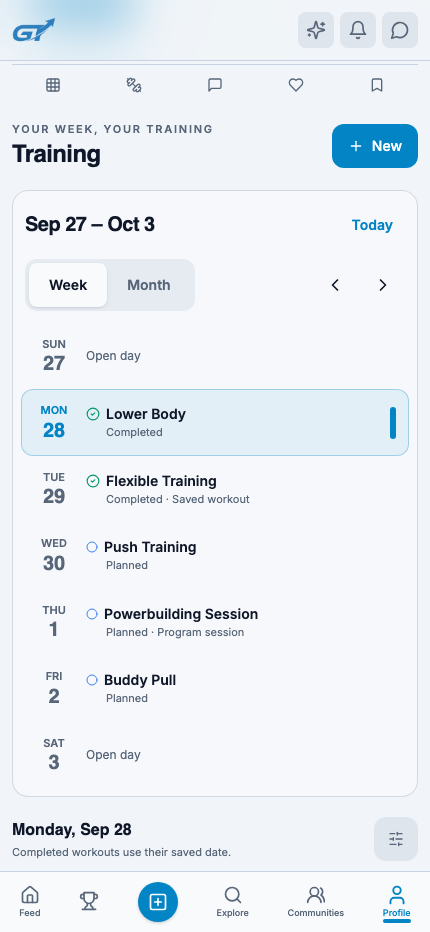
Open Explore → Programs to browse a curated marketplace of real programs, with progress tracking and autoregulation built in. Schedule one and it feeds straight into the logger, day by day.

Can I train like an athlete I follow?

Yes — "Train like" derives a plan from anyone you follow: their splits and loads, adapted to you.

Can I upload my coach's program?

Absolutely. Upload a screenshot, PDF or CSV and Get To parses it into a schedulable plan — reps-ranges, AMRAPs and all. You can also let Get To suggest your next session based on your real loads and recovery.

🏆 Challenges, communities & badges
How do challenges and leaderboards work?

Join or start a challenge with your gym or community and climb a live leaderboard ranked by volume, streaks or other metrics. Hit the milestones and you earn badges — permanent and collectible.

What are communities?

Communities are groups that train together and compete on a shared leaderboard — your gym, a coach's crew, or a public group that trains like you.

What are rivals?

Pick a rival and Get To keeps a head-to-head record between you — a little friendly rivalry to keep you both honest.

📤 Sharing & scorecards
How do I share a workout?

Every logged session can be posted to your feed with the numbers attached. Add a photo or video, a caption, and your workout's stats come along automatically.

What are scorecards?

Scorecards are editorial, animated cards built to leave the app — export to Instagram Stories, save as an image or video, and pick from premium templates and widgets (GPI, route, PR delta and more).

🔒 Account & privacy
Who can see my workouts?

You choose. Posts can be public, followers-only or private, and you can set a private account so only approved followers see your activity. Private accounts stay out of discovery.

How do I connect with friends?

Search by name or handle, tap Follow, and use Find Friends to see who from your contacts is on Get To. Direct messages are available between people who follow each other.

How do I delete my account?

Go to Settings → Account → Delete account. This permanently removes your data. Need help? Contact us and we'll take care of it.

Didn't find it? Ask us anything →

What's new

Everything new in Get To.

We ship constantly — often several improvements a week. Here's what's landed and what's in the works.

v1.1.0In developmentSummer 2026
  • Faster media. Feed photos are up to 95% lighter, uploads retry through a bad signal, and you can cancel an in-progress upload.
  • Smarter Momentum. A rebuilt consistency engine that rewards showing up and eases off when you rest.
  • Notifications that land. Tap a like or comment and go straight to the exact spot it happened.
  • Premium scorecards. New templates, widgets and video export for sharing your sessions.
v1.0.9Released
  • Premium shareables — Instagram Stories export, editorial templates and clean styles.
  • Smoother onboarding so you can post the moment you finish setting up.
  • Wearables UX polish and more faithful program uploads.
v1.0.8Released
  • Wearable integrations. Connect Apple Watch, Garmin, Oura, Whoop, Fitbit and Polar — with premium per-brand cards, zones and route maps.
  • GPI v2. An absolute 0–1000 performance score with struck-metal tiers and a "why it moved" story.
  • Programs. A curated marketplace, "Train like" an athlete, upload-your-own, and Get To-suggested sessions.
  • Settings redesign and a big pass on core-loop reliability.
v1.0.xReleased
  • The foundation: the social feed, workout logging, challenges & communities, badges, and the first GPI score.
What's next

Where Get To is headed.

An honest look at what we're building next. These are directions, not promises — priorities shift as we learn from you.

🟢 Now Live & shipping

  • GPI — your 0–1000 performance score
  • Wearable integrations (6 providers)
  • Curated programs + Train-like + upload
  • Challenges, communities & badges
  • Scorecards & social sharing

🟣 Exploring On the horizon

  • Android
  • Gym & coach partnerships
  • Gear & supplement integrations
  • More ways to compete and connect

Have something you want to see? Suggest a feature →

FAQ

Questions, answered.

The quick version. For step-by-step help, head to the Guides.

How is Get To different from other workout trackers?

Most apps are a private logbook with a feed bolted on. Get To is an advanced logger and a social performance network — every session is scored (GPI), ranked on leaderboards, and shared with your gym. You don't have to choose between great tracking and a real community.

Is Get To free?

Yes — logging, the feed, GPI, wearables and inspired workouts are free. A premium tier adds advanced coaching, unlimited summaries and pro sharing tools.

What is GPI?

The Get To Performance Index — one honest score from 0 to 1000 that reflects your whole training life and updates the moment you train.

Which wearables can I connect?

Apple Watch, Garmin, Oura, Whoop, Fitbit and Polar.

Is there an Android version?

Get To is on iOS today. Android is on our radar — follow the roadmap for updates.

How do I earn a badge?

Hit milestones in challenges, streaks and personal records. Badges are permanent and collectible, and they show up on your profile.

Can I import my own program?

Yes — upload a screenshot, PDF or CSV and we'll turn it into a schedulable plan that feeds the logger.

Is my data private?

You control what's shared. Posts can be public, followers-only or private, and a private account keeps you out of discovery. See our Privacy Policy.

The Log

Notes from the floor.

Training ideas, product deep-dives and the thinking behind Get To. More on the way.

Performance

What your GPI actually measures

A look under the hood of the 0–1000 score — strength, volume, consistency and recency, and why it moves the way it does.

Coming soon
Community

How to turn your gym into a leaderboard

Start a challenge, invite your crew, and watch consistency go up when everyone's watching. A playbook.

Coming soon
Product

Logging that keeps up with your set

Why we built a logger you use during the workout, not after — targets, prefill, rest timers and live PRs.

Coming soon

Want these in your inbox first? Say hi →

Contact

Talk to us.

We're a small team and we read everything. Whatever it is, we'd love to hear it.

Opens your email app addressed to our team.

Suggest a feature

Tell us what to build.

Get To is shaped by the people who use it. If there's something you wish it did, we want to hear it.

Big fan of a feature already on the list? Let us know — votes help us prioritize.

Report a bug

Something broken?

Sorry about that. Tell us what happened and we'll get on it fast.

Screenshots help a ton — attach them in the email that opens.

Careers

Build the future of training.

We're a small, fast team that ships every week.

Working at Get To

We're lifters building the app we always wanted. The team is tiny, the ownership is real, and the pace is quick — ideas go from a conversation to shipped in the same week. If you care about craft, love the gym, and want your work in the hands of a growing community, we'd love to know you.

Open roles

No formal openings right now — but we're always happy to meet talented builders, especially engineers and designers who train. Send us who you are and what you'd want to build.

Reach out at dom@get-to-fitness.com with a note and your work.
Legal

Terms of Service

Last updated: May 6, 2026

1. Acceptance of Terms

By accessing or using Get To Fitness ("the platform"), you agree to be bound by these Terms of Service. If you do not agree, please do not use the platform.

2. User Accounts

You are responsible for maintaining the confidentiality of your account credentials and for all activity under your account. You must provide accurate information and promptly update it if it changes. We reserve the right to suspend or terminate accounts that violate these Terms.

You may create an account using either an email address and password or a mobile phone number with SMS-based one-time passcode (OTP) verification. By providing a phone number, you agree to the SMS & Text Messaging terms described in Section 13.

3. User Content

You retain ownership of content you post, including workout logs, forum posts, gym reviews, media uploads, and profile information. By sharing content publicly, you grant Get To Fitness a non-exclusive, worldwide, royalty-free license to display, reproduce, and distribute it on the platform for the purpose of providing the service.

You are solely responsible for all content you upload. Content that violates these Terms, applicable law, or community standards may be removed, and your account may be suspended or banned.

4. Copyright & Intellectual Property

You represent and warrant that any content you upload, post, or otherwise make available through Get To Fitness does not infringe upon the copyrights, trademarks, or other intellectual property rights of any third party. You are solely responsible for ensuring you have the necessary rights, licenses, or permissions to share any content on the platform.

Get To Fitness does not endorse, verify, or assume responsibility for user-uploaded content. If you upload copyrighted material without authorization, you may be subject to account suspension or termination and may face legal liability.

5. Prohibited Conduct

You may not use the platform for illegal purposes, harassment, spam, impersonation, or to distribute harmful, abusive, or misleading content. Manipulation of leaderboards, GPI scores, challenges, or other competitive features through fraudulent activity is prohibited.

6. AI-Powered Features Disclaimer

Get To Fitness provides AI-powered features including:

  • Get To Coach — an AI fitness coaching assistant
  • Get To Suggested Workouts — AI-generated workout recommendations based on your training history or other users' workouts
  • AI Workout Summaries — automated post-workout analysis and social captions

All AI-powered features are provided for general informational and educational purposes only. These features are not a substitute for professional medical advice, diagnosis, treatment, or the guidance of a certified personal trainer, registered dietitian, physical therapist, or any other qualified health or fitness professional.

You acknowledge and agree that:

  • You should consult with a physician or qualified healthcare professional before beginning any exercise program, especially if you have pre-existing medical conditions, injuries, or health concerns.
  • AI-generated content — including workout suggestions, exercise recommendations, coaching responses, and performance analyses — may be inaccurate, incomplete, or unsuitable for your specific physical condition, fitness level, or health status.
  • AI-generated workout suggestions do not guarantee any specific physical results, body transformations, strength gains, or health outcomes.
  • You are solely responsible for evaluating the appropriateness of any AI-generated advice or workout plan before acting upon it.
  • Get To Fitness, its owners, employees, and affiliates shall not be held liable for any injury, loss, damage, or harm resulting from your reliance on or use of information provided by any AI-powered feature.
  • The "Inspired by Another User" feature generates workouts based on another user's session structure. This does not imply endorsement by that user, nor does it guarantee that the adapted workout is appropriate for you.
  • Imported biometric data from connected services (Apple Health, Apple Watch) — including heart rate, calorie estimates, workout duration, and body weight — is provided for informational purposes only. These values may be inaccurate or imprecise depending on device fit, sensor calibration, and activity type. Do not rely on imported biometric data for medical decisions.

7. GPI & Performance Metrics Disclaimer

The Get To Performance Index (GPI) and related metrics (tier, percentile, segment rank, weekly recaps) are calculated using proprietary algorithms based on your logged training data. These scores are intended for motivational and comparative purposes only and do not constitute an assessment of your actual fitness, health status, or physical capability. Do not use GPI or any platform metric as a basis for medical decisions.

8. Challenges & Competitive Features

Get To Fitness offers challenges and competitive features between users. Participation is voluntary. You acknowledge that these features involve physical activity and the inherent risks described in Section 10. Get To Fitness is not responsible for injuries sustained during challenges or competitive activities.

9. Gym Reviews & User Recommendations

Gym reviews, ratings, and product recommendations are user-generated and reflect the opinions of individual users. Get To Fitness does not verify, endorse, or guarantee the accuracy of any review, rating, or recommendation. You should independently verify any information before relying on it.

10. Assumption of Risk

You acknowledge that physical exercise and fitness activities involve inherent risks of injury, illness, disability, or death. By using Get To Fitness and any of its features — including but not limited to workout logging, AI-generated workout suggestions, AI coaching, training programs, challenges, clubs, and GPI-tracked activities — you voluntarily assume all risks associated with such activities.

You represent that you are physically able to engage in exercise and have obtained any necessary medical clearance to do so. You agree to immediately stop any activity that causes pain, discomfort, or adverse symptoms and to seek professional medical attention.

11. Indemnification

You agree to indemnify, defend, and hold harmless Get To Fitness, its owners, officers, directors, employees, agents, and affiliates from and against any and all claims, liabilities, damages, losses, costs, and expenses (including reasonable attorneys' fees) arising out of or in any way related to your use of the platform, your violation of these Terms, or your reliance on any information provided by AI-powered features, user-generated content, or any other feature of the platform.

12. Limitation of Liability

Get To Fitness is provided "as is" and "as available" without warranties of any kind, whether express or implied, including but not limited to implied warranties of merchantability, fitness for a particular purpose, and non-infringement. To the fullest extent permitted by applicable law, Get To Fitness and its affiliates shall not be liable for any indirect, incidental, special, consequential, or punitive damages, including but not limited to personal injury, loss of data, loss of profits, or damages arising from your use of or inability to use the platform or any content provided therein — including AI-generated workout suggestions, coaching advice, performance metrics, or user-generated content.

13. SMS & Text Messaging Terms

Get To Fitness offers SMS-based phone number authentication as an alternative to email-based account creation and sign-in. By providing your mobile phone number and choosing to sign up or sign in via phone, you expressly consent to receive text messages from Get To Fitness for the following purposes:

  • Account verification: One-time passcodes (OTPs) sent to verify your identity during sign-up or sign-in.
  • Account security: Verification codes for password resets, account recovery, or suspicious login notifications.

Message Frequency & Rates

Message frequency varies based on your authentication activity. You will only receive messages when you actively initiate a sign-in, sign-up, or account verification action. Message and data rates may apply depending on your mobile carrier and plan. Get To Fitness is not responsible for any charges incurred from your carrier.

Opting Out of SMS

You may opt out of receiving SMS messages at any time by:

  • Switching to email-based authentication in your account settings.
  • Contacting us at dom@get-to-fitness.com with the subject line "SMS Opt-Out" and including your phone number.

If you opt out of SMS, you may still use the platform by signing in with your email address and password. Opting out of SMS does not affect your account or any other platform functionality.

Phone Number Privacy

Your phone number is collected solely for authentication purposes. It is not shared with other users, displayed on your profile, used for marketing, sold to third parties, or used for any purpose beyond identity verification and account security. See our Privacy Policy for full details on how your data is handled.

Carrier Disclaimer

Carriers are not liable for delayed or undelivered messages. Get To Fitness is not responsible for SMS delivery failures caused by carrier issues, network outages, invalid phone numbers, or device settings that block incoming messages.

Supported Carriers

SMS verification is available on most major U.S. and international mobile carriers. Availability may vary. If you are unable to receive verification codes, please use email-based authentication instead.

14. In-App Messaging & Communications

Direct messages sent through the platform are private between participants. Get To Fitness does not routinely monitor message content but reserves the right to review messages in response to reports of abuse, harassment, or violations of these Terms. Do not share sensitive personal, financial, or medical information through the messaging system.

By using the in-app messaging feature, you agree not to send unsolicited commercial messages, spam, phishing attempts, or content that violates these Terms or applicable law. Violations may result in account suspension or termination.

15. Email Communications

By creating an account, you consent to receive transactional emails from Get To Fitness, including account verification, password reset links, weekly digests, and platform notifications. You may unsubscribe from non-essential emails at any time using the unsubscribe link provided in each email or by contacting us.

16. Account Deletion

You may permanently delete your account at any time from your profile settings. Account deletion is irreversible and results in the permanent removal of all associated data, including workout logs, posts, messages, media files, GPI history, imported Apple Health data, and profile information.

17. Connected Services, Push Notifications & Imported Biometrics

Apple Health (HealthKit). When you grant Apple Health permission on iOS, Get To Fitness reads heart rate, active calories, body weight, and workout sessions from your Apple Watch and other devices connected to Apple Health to enrich your logged workouts. Access is read-only — we do not write to Apple Health. You may revoke access at any time via iOS Settings → Health → Data Access & Devices → Get To Fitness. See our Privacy Policy for full details on what is read, stored, and how to control it.

Cardio auto-import. If you enable the "Auto-import Watch cardio" toggle in Settings, Get To Fitness will automatically import cardio workouts (running, walking, cycling, swimming, rowing, elliptical, stairs, hiking) recorded by your Apple Watch as separate workout posts. The toggle is off by default and may be turned off at any time. Imported workouts may be edited or deleted like any other post.

Push notifications. Get To Fitness sends push notifications via Apple Push Notification service (APNs) for social interactions (likes, comments, follows, mentions, direct messages), challenges, plan updates, and other platform events. You may control push notifications in two ways: (a) at the iOS system level via Settings → Notifications → Get To Fitness; or (b) per-type in Settings → Notification preferences within the Get To Fitness app.

18. Changes to These Terms

We may update these Terms from time to time. When we make material changes, we will notify you through the platform and require you to re-accept the updated Terms before continuing to use the service.

19. Contact

For questions about these terms, contact us at dom@get-to-fitness.com.

DMCA Policy & Copyright Dispute Resolution

Get To Fitness respects the intellectual property rights of others and complies with the Digital Millennium Copyright Act (DMCA). As a service provider, we act expeditiously to remove or disable access to content that is reported as infringing.

Filing a DMCA Takedown Notice

If you are a copyright owner, or authorized to act on behalf of one, and believe that content hosted on Get To Fitness infringes your copyright, you may submit a written takedown notice to our designated agent with the following information:

  1. A physical or electronic signature of the copyright owner or authorized representative.
  2. Identification of the copyrighted work claimed to have been infringed.
  3. Identification of the infringing material, including a URL or specific location on the platform.
  4. Your contact information (name, address, telephone number, and email address).
  5. A statement that you have a good faith belief that the use of the material is not authorized by the copyright owner, its agent, or the law.
  6. A statement, made under penalty of perjury, that the information in the notification is accurate and that you are authorized to act on behalf of the copyright owner.

Designated Agent

All DMCA takedown notices should be sent to our designated copyright agent at dom@get-to-fitness.com with the subject line DMCA Takedown Request.

Counter-Notification

If you believe your content was removed in error, you may submit a counter-notification containing:

  1. Your physical or electronic signature.
  2. Identification of the material that was removed and its prior location on the platform.
  3. A statement under penalty of perjury that you have a good faith belief the material was removed by mistake or misidentification.
  4. Your name, address, and telephone number, and a statement consenting to the jurisdiction of the federal court in your district.

Repeat Infringers

Get To Fitness maintains a policy of terminating the accounts of users who are determined to be repeat infringers of copyright.

Safe Harbor

Get To Fitness operates as a service provider under Section 512 of the DMCA. We do not monitor or pre-screen user-uploaded content. Upon receiving a valid takedown notice, we will act expeditiously to remove or disable access to the allegedly infringing material.

Legal

Privacy Policy

Last updated: May 6, 2026

Get To Fitness ("we", "us", "our") is committed to protecting your privacy. This Privacy Policy explains what information we collect, how we use it, and the choices you have.

1. Information We Collect

We collect the following categories of information:

  • Account information: Email address, phone number (if used for phone-based authentication), display name, and encrypted password.
  • Profile information: First name, last name, age, gender, country, state, bio, avatar image, fitness goals, height, weight, and body-weight logs.
  • Workout & training data: Workout logs, exercises, sets, reps, weights, duration, personal records, media (photos and videos) attached to workouts, training programs, and program workout logs.
  • Social & community data: Posts, comments, likes, saved posts, follows, direct messages, forum posts, song-of-the-day submissions, gym reviews, club entries, and challenge participation.
  • Apple Health (HealthKit) data (iOS only, opt-in): When you grant Apple Health permission, we read heart rate samples, active energy burned (calories), body mass (weight), and workout sessions (HKWorkout) from your iOS device. Access is read-only — we do not write any data back to Apple Health. See Section 5 for details.
  • Push notification tokens: When you enable push notifications, your device's APNs (Apple Push Notification service) token is stored to deliver alerts about social interactions, challenges, and platform events.
  • AI interaction data: Queries and responses generated through the Get To Coach (AI fitness coach), Get To Suggested Workouts, and AI-generated workout summaries. This data is processed to provide personalized suggestions and is not shared externally.
  • Performance metrics: GPI (Get To Performance Index) scores, tier classifications, percentile rankings, and weekly recap data derived from your training history.
  • Gym & location data: Gym names, cities, addresses, and coordinates you voluntarily provide when adding or reviewing gyms.
  • Technical & diagnostic data: Browser type, device information, IP address, platform usage patterns, and crash/error logs (including stack traces, breadcrumbs, and your user identifier) used for diagnosing issues, security, and platform optimization.
  • Contact submissions: Name, email, phone number, and message content submitted through the contact form.

2. How We Use Your Information

We use your information to:

  • Provide and maintain the Get To Fitness platform and its core features.
  • Authenticate your identity through email verification or SMS-based one-time passcodes.
  • Personalize your experience, including workout suggestions, AI coaching responses, and performance metrics.
  • Generate AI-powered content such as Get To Suggested Workouts, workout summaries, and coaching advice using third-party AI models. Your training data is sent to AI service providers solely for generating responses and is not used to train third-party models.
  • Calculate and display your GPI score, tier, and leaderboard rankings.
  • Enable social features including the workout feed, messaging, comments, likes, follows, challenges, and clubs.
  • Auto-attach biometric data from your Apple Watch (heart rate, active calories, workout duration) to workouts you log on Get To Fitness, when you have granted Apple Health permission.
  • Auto-import cardio workouts (running, walking, cycling, swimming, rowing, elliptical, stairs, hiking) recorded by your Apple Watch as separate workout posts, when you have enabled this option in Settings.
  • Send transactional notifications about social interactions, challenges, account security, and platform updates via in-app notifications, push notifications, and email.
  • Send SMS messages containing one-time verification codes when you choose to authenticate via phone number.
  • Diagnose crashes, errors, and performance issues through crash and error reporting.
  • Enforce our Terms of Service, including content moderation and ban enforcement.
  • Improve the platform through aggregated, anonymized analytics.

3. Data Sharing & Third Parties

We do not sell your personal information to any third party.

We may share limited data with:

  • AI service providers: Workout history and exercise data is sent to AI models (e.g., Google Gemini) to generate personalized workout suggestions, coaching responses, and workout summaries. Data is transmitted securely and is not retained by providers for model training.
  • SMS service providers: When you use phone-based authentication, your phone number is shared with our SMS delivery partner (Twilio) solely for the purpose of delivering verification codes. Twilio processes this data under its own privacy policy and data-processing agreements. Your phone number is not used for marketing by Twilio or any third party.
  • Email service providers: Your email address is shared with our email delivery partner (Resend) solely for sending transactional emails such as verification links, password resets, and weekly digests.
  • Push notification delivery: Push notifications are delivered to your iOS device via Apple Push Notification service (APNs). Apple processes the device token and message payload under its own privacy policy.
  • Crash and error reporting: Sentry receives crash reports, error logs, device information, breadcrumbs, and your user identifier when the app encounters runtime issues. This data is used solely for diagnosing and fixing technical problems and is not used for marketing or analytics.
  • Media delivery (CDN): Cloudflare proxies images and videos served from media.get-to-fitness.com to optimize delivery speed. Cloudflare receives request metadata (IP address, user-agent) as part of standard CDN operation under its own privacy policy.
  • Infrastructure providers: Hosting and database services (Supabase) that process data on our behalf under strict data-processing agreements.
  • Apple Health data: Apple Health data read from your iOS device is not shared with any third party. It is processed solely on Get To Fitness servers to enrich your workouts and is never sold, used for marketing, or used for advertising.
  • Legal obligations: When required by law, subpoena, or court order.

Content you mark as public — including workout posts, forum entries, gym reviews, club entries, and profile information — may be visible to other users on the platform.

4. Phone Number & SMS Data

If you choose to authenticate using your phone number:

  • Your phone number is stored securely in our authentication system and is used exclusively for identity verification and account security.
  • Your phone number is never displayed on your public profile, shared with other users, or used for marketing or promotional purposes.
  • SMS messages are sent only when you actively initiate a sign-in, sign-up, or account verification action. We do not send unsolicited text messages.
  • You may switch to email-based authentication at any time to stop receiving SMS messages.
  • Message and data rates from your mobile carrier may apply. Get To Fitness is not responsible for carrier charges.

5. Apple Health (HealthKit) Data

Get To Fitness can read data from Apple Health on iOS to enrich your workouts. This is opt-in and granular — you choose which data types to share when iOS prompts you for permission.

  • Read-only access: We do not write any data to Apple Health. All data flow is one-direction (Apple Health → Get To Fitness).
  • Data types accessed: Heart rate samples, active energy burned (calories), body mass (weight), and workout sessions (HKWorkout).
  • How we use it: Auto-attach heart rate, calorie burn, and workout duration from your Apple Watch to workouts you log on Get To Fitness; auto-fill body weight to your Progress page; optionally auto-import cardio workouts (running, walking, cycling, swimming, rowing, elliptical, stairs, hiking) from your Apple Watch as separate posts (controlled by the "Auto-import Watch cardio" toggle in Settings).
  • What we store: Imported biometric values (heart rate average and peak, active calories, duration) are stored alongside the corresponding workout in our database. We retain a reference to the source Apple Health workout (a UUID) for deduplication purposes.
  • Granular permission: Apple Health requires per-type permission. You may grant access to some data types and deny others.
  • Revocation: You may revoke Apple Health access at any time via iOS Settings → Health → Data Access & Devices → Get To Fitness. Revocation stops new data from flowing in. Previously imported data remains stored on Get To Fitness until you delete the corresponding workout(s) or your account.
  • No third-party sharing: Apple Health data is not sold, shared with advertisers, or used for marketing. It is processed solely to provide the features described above.

6. Push Notifications

Get To Fitness sends push notifications to your iOS device for social interactions (likes, comments, follows, mentions, direct messages), challenges, plan updates, and other platform events. Push notifications are delivered via Apple Push Notification service (APNs).

  • Device token: When you enable push notifications, your device's APNs token is stored to enable delivery. The token is not used for any other purpose.
  • Per-type controls: You may toggle individual notification categories (likes, comments, follows, mentions, challenges, plans, etc.) independently in Settings → Notification preferences within the Get To Fitness app.
  • System-level controls: You may disable all push notifications at the iOS system level via Settings → Notifications → Get To Fitness.

7. Data Retention

Your data is retained for as long as your account is active. Content including workout posts, forum entries, and associated media does not automatically expire or age out. Data remains in storage indefinitely unless manually deleted by you or removed through account deletion.

When you delete your account, all associated data — including workout logs, posts, messages, media files, phone number, imported Apple Health data, and profile information — is permanently removed. Orphaned media files are cleaned up by an automated weekly process.

8. User Privacy Controls

You have control over your data visibility:

  • Private account: Set your account to private to restrict visibility of your profile and workouts to approved followers only.
  • Private progress: Hide performance metrics (streaks, PRs, e1RM charts) from all other users, including followers.
  • Selective visibility: Toggle visibility for gym membership, lifts, stats, and workout history independently.
  • GPI visibility: Control whether your GPI tier is visible to others.
  • SMS opt-out: Switch to email-based authentication at any time to discontinue SMS messages.
  • Push notifications: Toggle per-type notification preferences in the app, or disable all push at the iOS system level.
  • Apple Health access: Revoke per-type or all access via iOS Settings → Health → Data Access & Devices → Get To Fitness.
  • Cardio auto-import: Toggle "Auto-import Watch cardio" in Settings to control whether Apple Watch cardio sessions are automatically imported as separate posts.

9. Data Security

We use industry-standard security measures to protect your data, including encryption in transit (TLS) and at rest, row-level security policies on all database tables, and secure authentication protocols. Phone numbers and passwords are stored using secure hashing and encryption. Uploaded media is stored in access-controlled buckets with folder-level security.

10. Children's Privacy

Get To Fitness is not intended for users under the age of 13. We do not knowingly collect personal information from children. If we learn that we have collected data from a child under 13, we will promptly delete it.

11. Changes to This Policy

We may update this Privacy Policy from time to time. When we make material changes, we will notify you through the platform and may require you to re-accept the updated terms before continuing to use the service.

12. Contact

For privacy-related inquiries, contact us at dom@get-to-fitness.com.

Legal

Data & Consent

Last updated: May 6, 2026

Your Consent

By creating an account and using Get To Fitness, you consent to the collection, storage, and processing of the personal data you provide — including your email address, phone number (if used for authentication), profile details, workout logs, media uploads, messages, and any content you share on the platform.

This data is used solely to provide and improve the Get To Fitness experience. We do not sell your personal data to third parties.

What Data We Collect

  • Account data: Email, phone number (if used for phone-based authentication), display name, password (encrypted)
  • Profile data: Name, age, gender, country, state, bio, avatar, fitness goals, height, weight
  • Workout & training data: Workout logs, exercises, sets, reps, weights, duration, personal records, training programs, program workout logs, and body-weight history
  • Social & community data: Posts, comments, likes, saved posts, follows, direct messages, forum posts, gym reviews, club entries, challenge participation, and song-of-the-day submissions
  • Media data: Photos and videos uploaded to workouts, posts, profiles, and gym reviews. Media is stored in secure, access-controlled storage buckets.
  • Apple Health data (iOS only, opt-in): Heart rate, active energy burned (calories), body mass (weight), and workout sessions read from Apple Health when you grant permission. Read-only access — we do not write back to Apple Health.
  • Push notification tokens: Your device's APNs (Apple Push Notification service) token if you enable push notifications.
  • AI interaction data: Data processed by AI features including Get To Coach, Get To Suggested Workouts, and AI workout summaries. Your training history is sent to AI models to generate personalized responses.
  • Performance data: GPI scores, tier classifications, percentile rankings, weekly recap analytics, and leaderboard positions
  • Location data: Gym locations (city, address, coordinates) you voluntarily provide
  • Technical & diagnostic data: Browser type, device info, IP address, and crash/error logs (stack traces, breadcrumbs, your user identifier) for diagnosing issues, security, and platform optimization
  • Contact data: Name, email, phone, and message content from contact form submissions

SMS & Phone Number Consent

If you choose to sign up or sign in using your mobile phone number, you expressly consent to receive SMS text messages from Get To Fitness containing one-time verification codes for the sole purpose of authenticating your identity.

  • Purpose: SMS messages are used exclusively for account verification and security. We do not send marketing, promotional, or advertising messages via SMS.
  • Frequency: Messages are sent only when you actively initiate a sign-in, sign-up, or verification action. There are no recurring automated messages.
  • Rates: Standard message and data rates from your mobile carrier may apply. Get To Fitness is not responsible for any charges from your carrier.
  • Opt-out: You may stop receiving SMS messages at any time by switching to email-based authentication in your account settings, or by contacting us at dom@get-to-fitness.com.
  • Privacy: Your phone number is never displayed publicly, shared with other users, or used for marketing. It is shared only with our SMS delivery partner (Twilio) for code delivery.
  • Carrier liability: Mobile carriers are not liable for delayed or undelivered messages.

Apple Health (HealthKit) Consent

If you grant Get To Fitness permission to access Apple Health on iOS, you consent to read-only access to specific health and workout data from your iOS device for the purposes described below. Apple Health permission is opt-in and granular — iOS prompts you per data type and you may grant some types while denying others.

  • Data types accessed: Heart rate samples, active energy burned (calories), body mass (weight), and workout sessions (HKWorkout) recorded by your Apple Watch or other devices connected to Apple Health.
  • How we use it: Auto-attach heart rate, calorie burn, and workout duration from your Apple Watch to workouts you log on Get To Fitness; auto-fill body weight to your Progress page; optionally auto-import cardio workouts (running, walking, cycling, swimming, rowing, elliptical, stairs, hiking) as separate posts (controlled by the "Auto-import Watch cardio" toggle in Settings, off by default).
  • Read-only: We do not write any data back to Apple Health.
  • Storage: Imported biometric values (heart rate average and peak, active calories, duration) are stored alongside the corresponding workout in our database. We retain a reference to the source Apple Health workout (a UUID) for deduplication purposes.
  • Revocation: You may revoke Apple Health access at any time via iOS Settings → Health → Data Access & Devices → Get To Fitness. Revocation stops new data from flowing in. Previously imported data remains stored on Get To Fitness until you delete the corresponding workout(s) or your account.
  • No third-party sharing: Apple Health data is not sold, shared with advertisers, or used for marketing. It is processed solely on Get To Fitness servers to provide the features described.

Push Notifications Consent

If you enable push notifications when prompted on first launch (or via iOS Settings → Notifications → Get To Fitness), you consent to receive push messages on your iOS device for the categories listed below.

  • Categories: Social events (likes, comments, follows, mentions, direct messages), challenges and competitive milestones, plan and program updates, account security, and platform notifications.
  • Delivery: Push messages are delivered via Apple Push Notification service (APNs). Your device's APNs token is stored solely to enable delivery and is not used for any other purpose.
  • Per-type controls: Toggle individual notification categories independently in Settings → Notification preferences within the Get To Fitness app.
  • System-level controls: Disable all push notifications at the iOS system level via Settings → Notifications → Get To Fitness.

Email Communications Consent

By creating an account with an email address, you consent to receive transactional emails from Get To Fitness, including:

  • Email verification links
  • Password reset links
  • Weekly digests and performance summaries
  • Platform notifications (follows, comments, likes, challenges)

You may unsubscribe from non-essential emails at any time using the unsubscribe link in each email or by contacting us. Essential account security emails (verification, password reset) cannot be opted out of while your account is active.

In-App Messaging Consent

By using the direct messaging feature on Get To Fitness, you consent to send and receive messages with other users on the platform. Messages are private between participants. You agree not to use messaging for spam, harassment, phishing, unsolicited commercial messages, or any content that violates our Terms of Service.

Get To Fitness does not routinely monitor message content but reserves the right to review messages in response to reports of abuse or violations. Message data is stored securely and deleted permanently when you delete your account or a conversation.

How Your Data Is Processed by AI

When you use AI-powered features (Get To Coach, Get To Suggested Workouts, AI Workout Summaries), your recent workout history and exercise data is sent to third-party AI models to generate personalized responses. This data is:

  • Transmitted securely over encrypted connections
  • Used solely to generate your specific response
  • Not retained by AI providers for model training purposes
  • Not shared with other users or third parties

AI-generated content is for informational purposes only and does not constitute medical, health, or professional fitness advice.

Third-Party Service Providers

Get To Fitness uses the following service providers, each processing limited data under their own privacy policies and data-processing agreements:

  • Apple Push Notification service (APNs): Delivers push notifications to your iOS device.
  • Apple HealthKit (iOS only): Provides on-device read access to heart rate, calories, weight, and workout data when you grant permission.
  • Twilio: Delivers SMS verification codes when you use phone-based authentication.
  • Resend: Delivers transactional emails (verification, password reset, weekly digests).
  • Google Gemini: Generates AI workout summaries, suggestions, and coaching responses. Data sent for generation is not retained for model training.
  • Sentry: Receives crash reports, error logs, breadcrumbs, device information, and your user identifier for diagnosing technical issues. Used solely for engineering diagnostics, not for marketing or analytics.
  • Cloudflare: Proxies media (images and videos) served from media.get-to-fitness.com for fast delivery. Receives request metadata as part of standard CDN operation.
  • Supabase: Provides our hosted database and authentication infrastructure.

Data Retention

Your data is retained for as long as your account is active. Content — including workout posts, forum entries, messages, imported Apple Health data, and associated media — does not automatically expire. Data remains stored indefinitely unless manually deleted by you or removed through account deletion.

Orphaned media files (files no longer associated with any active record) are automatically cleaned up on a weekly basis.

Your Rights

  • Access: You can view all your data from your profile page.
  • Correction: Edit your profile at any time to update your information.
  • Deletion: You can permanently delete your account and all associated data from the Edit Profile section. This is irreversible.
  • Portability: Your workout data is accessible through your profile and can be viewed at any time.
  • Withdraw consent: You may withdraw consent at any time by deleting your account.

Opt-Out Options

You can opt out of the following:

  • SMS messages: Switch to email-based authentication to stop receiving text messages. Email dom@get-to-fitness.com with subject "SMS Opt-Out" and your phone number.
  • Push notifications (per-type): Toggle individual notification categories in Settings → Notification preferences within the Get To Fitness app.
  • Push notifications (all): Disable at the iOS system level via Settings → Notifications → Get To Fitness.
  • Apple Health access: Revoke per-type or all access via iOS Settings → Health → Data Access & Devices → Get To Fitness.
  • Cardio auto-import: Toggle "Auto-import Watch cardio" off in Settings.
  • Non-essential emails: Unsubscribe via the link in any email, or contact us.
  • Public profile visibility: Set your account to private to restrict visibility to approved followers only.
  • Private progress: Hide performance metrics (streaks, PRs, e1RM charts) independently from your public profile.
  • GPI visibility: Control whether your GPI tier is shown to others.
  • Selective content visibility: Toggle visibility for gym membership, lifts, stats, and workout history independently.
  • Full data removal: Delete your account entirely via Edit Profile → Delete Account. This is permanent and irreversible.

Contact Us

For any data-related requests or questions, email us at dom@get-to-fitness.com.